
Working with Tags
ProjectsTags (keywords) are one of the most powerful tools in ETRM for organizing requirements beyond the project structure.
Functions of Tags
1. Creating and Designing Tags
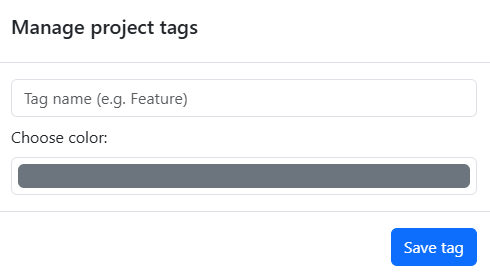
You can define individual tags for each project. You have full control over:
- Name: Assign concise names (e.g.,
Mechanics,Prio: High,V1.0). A tag name must be unique within a project. - Color Selection: Assign a specific color to each tag. This helps to visually distinguish requirements in the list at a glance.
2. Assignment
Assignment takes place directly in the detail view of a requirement. A requirement can have any number of tags simultaneously.
Organization and Workarounds
The "Status Workaround"
Many experienced users use tags to map a custom workflow.
* Example: Create tags like Status: In Review, Status: Ready for Test, or Status: Waiting for Customer.
* Advantage: You can define as many intermediate steps as your specific process requires.
Filtering by Tags
In the requirements list of your project, you will find the Tag Filter.
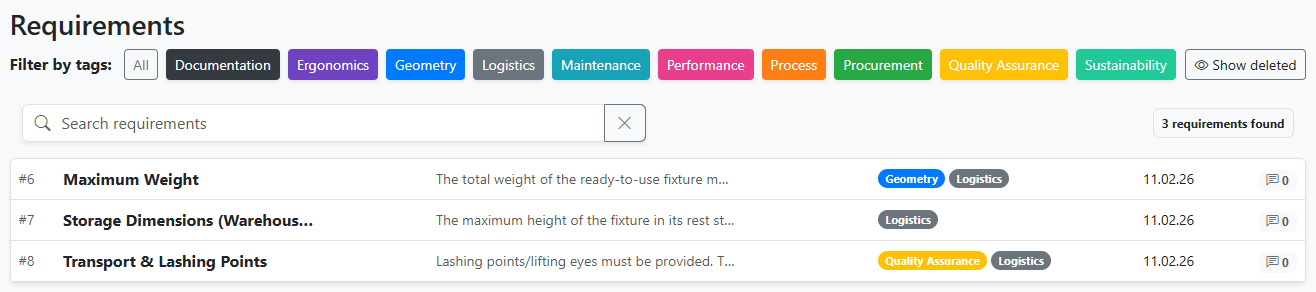
- Selecting one or more tags immediately reduces the view to the relevant requirements.