
Wording check and glossary
SpecifyThe video is narrated in German; you can switch on subtitles in the player. Playing the video connects to YouTube (Google). More in the privacy policy · Watch on YouTube
Wording check
ETRM checks the title and text of every requirement for typical weaknesses. The check is rule-based: it works with word lists and patterns in German and English, not with artificial intelligence, and therefore delivers traceable and consistent results. A hint is not an error but a reason to take a closer look.
| Hint | Detects, for example | Better |
|---|---|---|
| Vague term | fast, as possible, sufficient, user-friendly, etc. | measurable criterion with value and unit |
| “and/or”: ambiguous | “open and/or limit” | state whether both or one applies, or split |
| Several statements | two sentences with “shall” | one requirement per statement |
| Open point | TBD, TBC, to be defined | clarify before approval |
| Weak obligation | should, could, might | shall (binding) |
| Number without unit | “less than 250” | “less than 250 A” |
| Limit without a value | “at most the permissible value” | state the limit with number and unit |
Standards, chapter numbers, years and counted items (“96 cells”) are not treated as missing units.
Where the hints appear
- While writing: below the editor, as you type.
 * In the document view: as a light bulb with a count in the row. Hovering shows the findings.
* On the artifact page: as a yellow box with findings and a suggestion for improvement.
* In the table view: with the filter Wording: with wording hint.
* In the metrics: number per rule and list of all affected artifacts.
Which types are checked
Artifact types with Check wording switched on in the project properties are checked. In the ISO 29148 profile these are stakeholder requirements, system requirements and constraints; headings, information, test cases and glossary terms are excluded.
Sentence templates
Template … in the editor toolbar inserts sentence patterns based on EARS, for example “When <trigger>, the <system> shall <response>.” Explanation and examples can be found under Formulating requirements correctly.
Glossary
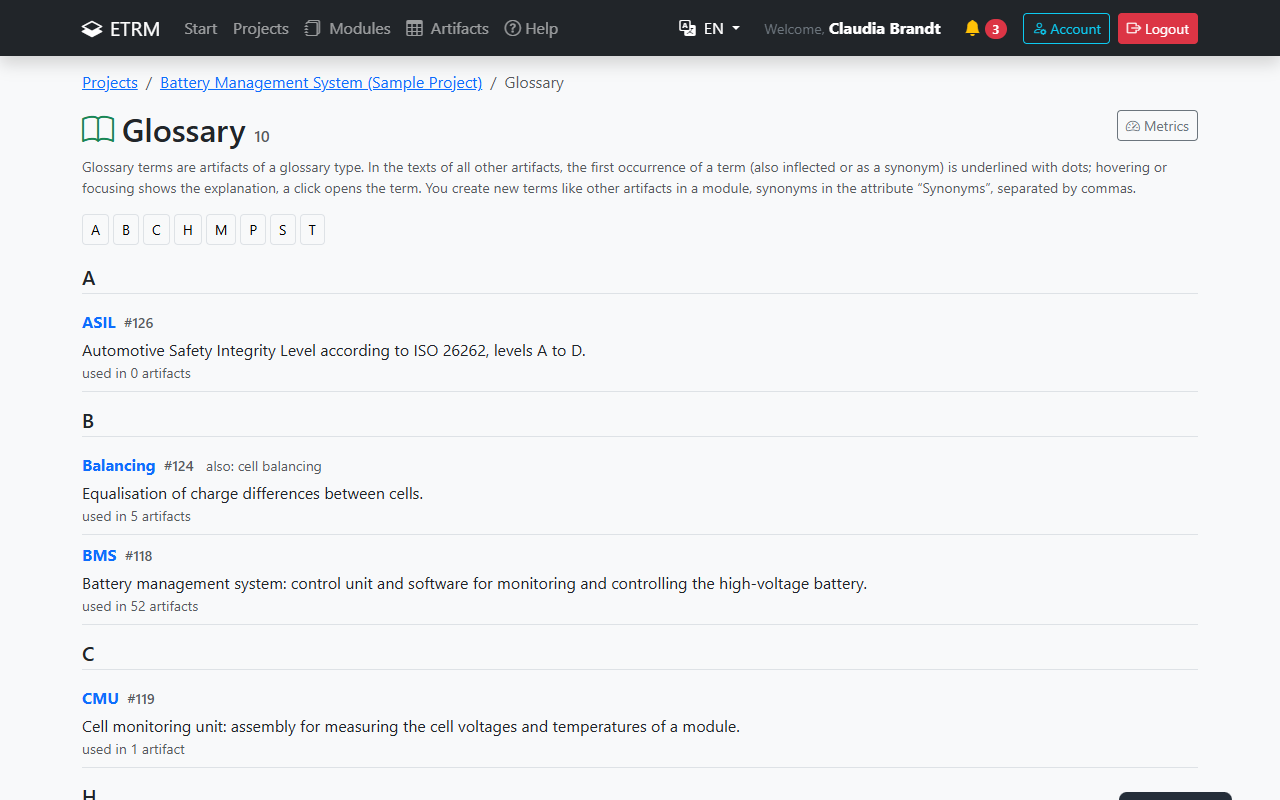
The glossary contains the technical terms of the project with their explanation. Each term is an artifact of a glossary type (in the ISO 29148 profile: glossary term) and is created in a module like other artifacts: the title is the term, the text the explanation.
Terms in texts
In all other texts of the project, the first occurrence of a term is underlined with dots. Hovering or keyboard focus shows the explanation, a click opens the term. ETRM recognises:
- inflected forms (German endings such as Hauptschütz → Hauptschütze),
- abbreviations in brackets in the title (Ladezustand (SoC) → Ladezustand and SoC),
- further spellings from the attribute Synonyms, separated by commas (State of Charge).
The highlighting is only added in the display. The saved text remains unchanged, also in exports.
The glossary page
Glossary in the project overview shows all terms from A to Z with explanation, synonyms and the number of artifacts that use the term. A term that no artifact uses is a candidate for tidying up; a term that appears in many requirements deserves a careful explanation.