
Project properties: artifact types, attributes, link types
Set up the projectThe video is narrated in German; you can switch on subtitles in the player. Playing the video connects to YouTube (Google). More in the privacy policy · Watch on YouTube
Every project has its own data model. It is created from a profile when the project is created and can be adapted freely afterwards under Properties (in the project overview, group admins only). This lets you reflect the terms and standards of your industry without anything being hard-wired.
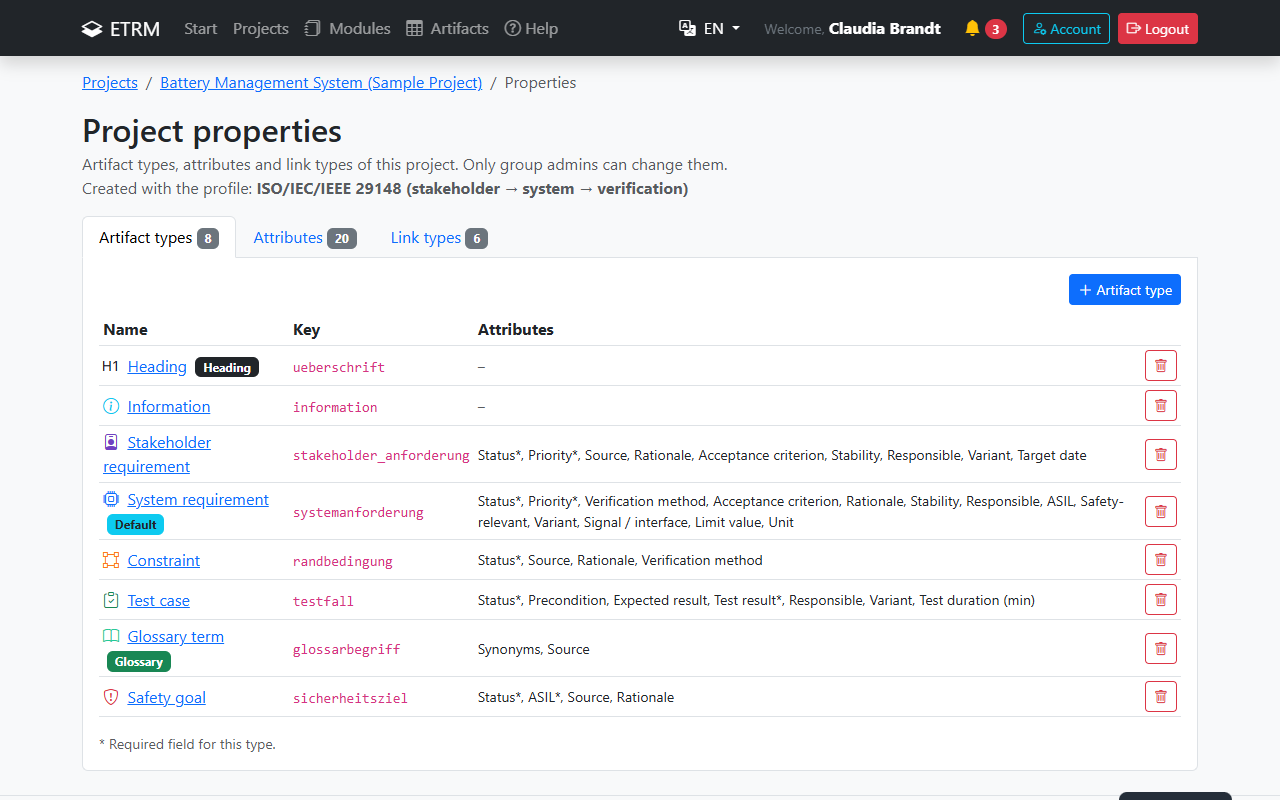
Artifact types
An artifact is the smallest unit in ETRM: a requirement, a heading, a test case, a glossary term. The artifact type determines which attributes an artifact has and how it is displayed.
| Setting | Meaning |
|---|---|
| Name, icon, colour | display in document, table and links |
| Key | fixed technical identifier (e.g. systemanforderung), cannot be changed after creation. It is used for ReqIF, table import and API. |
| Heading | Artifacts of this type form the chapters of a module. Only headings can have children. |
| Default type for new artifacts | preselection when creating in a module |
| Check wording | Texts of this type go through the wording check. It is switched off for headings, information, test cases and glossary terms. |
| Glossary term | Artifacts of this type are highlighted as technical terms in all texts. |
| Attributes of this type | which attributes the type has and which of them are required |
Attributes
Attributes describe artifacts in more detail, for example status, priority, verification method or ASIL. There are eight kinds: text (single and multi-line), enumeration (also with multiple choice), integer, decimal number, yes/no, date and user.
- Enumeration values have a fixed value (for export and API) and a label, optionally a colour. Coloured values appear as coloured badges in the document view.
- Default value: entered for new artifacts, for example status “draft”.
- Significant: if the value changes, links of the artifact become suspect (e.g. for a limit value). Changes to title and text always count as significant.
Link types
Link types define how artifacts are related. Each link type has a name in reading direction (source → target, e.g. “is derived from”) and an inverse name (target → source, e.g. “is derived into”).
- Allowed source and target types: prevent meaningless links, for example a test case that verifies a heading. Without a selection, all types are allowed.
- Suspect when the source or target changes: controls when a link is marked as suspect (Traceability).
- Hierarchical: links of this type must not form a cycle.
The ISO/IEC/IEEE 29148 profile comes with six link types: is derived from, refines, satisfies, verifies, conflicts with and depends on. In the German profile they are called leitet ab aus, verfeinert, erfüllt, verifiziert, steht im Konflikt mit and ist abhängig von; you can rename them at any time.
Tags
The Tags tab lists the project's tags with their colour and number of artifacts (outside and in the trash). Tags are created when they are assigned to an artifact; group admins can delete unused ones here. Baselines and history keep the name.
Changing safely
- Types, attributes and link types that are in use cannot be deleted. Rename them instead or remove their use first.
- If you add a required attribute to a type, existing artifacts keep their values; the required field is requested the next time they are edited.
- A ReqIF import can create new types and attributes. That is why only group admins start it.
Example: The sample project extends the profile with the type safety goal with the required attribute ASIL, and with variant, limit value (significant) and unit.